Flowcall Product Guide
Flowcall lets your business talk to your customers across every channel they use — WhatsApp, Instagram, live chat, email, and phone — for pre-sales, post-sales, customer support, product discovery, and marketing outreach.
What makes Flowcall different is that AI handles the first level of every conversation. When a customer reaches out, the AI talks to them, gathers the information it needs, and decides whether the conversation can be resolved automatically or needs to be handed over to a human. Your team steps in only when it matters.
The Problem: Data and Actions Scattered Across Systems
Without Flowcall, getting the full picture of a customer query — say, complete order details — means an agent has to juggle multiple different systems: the ecommerce platform, the CRM, maybe a custom internal backend. And once the agent understands the issue, taking action (issuing a refund, creating a replacement order, canceling an order) means logging into yet another platform and filling out yet another form.
Flowcall solves both halves of this:
- One place for all your data. Flowcall brings in data from every channel your business relies on — any popular ecommerce platform or CRM, or your own custom backend — through Integrations. Agents (and the AI) see the full picture in one workspace instead of switching tabs.
- True one-click mutations. Actions like creating a replacement order, canceling an order, or issuing a refund are wired into Workflows as callable APIs. The AI gathers whatever information the action needs from the conversation and fills it in, so executing it is genuinely one click — there's no form to fill out by hand.
The Core Idea: AI First, Humans When Needed
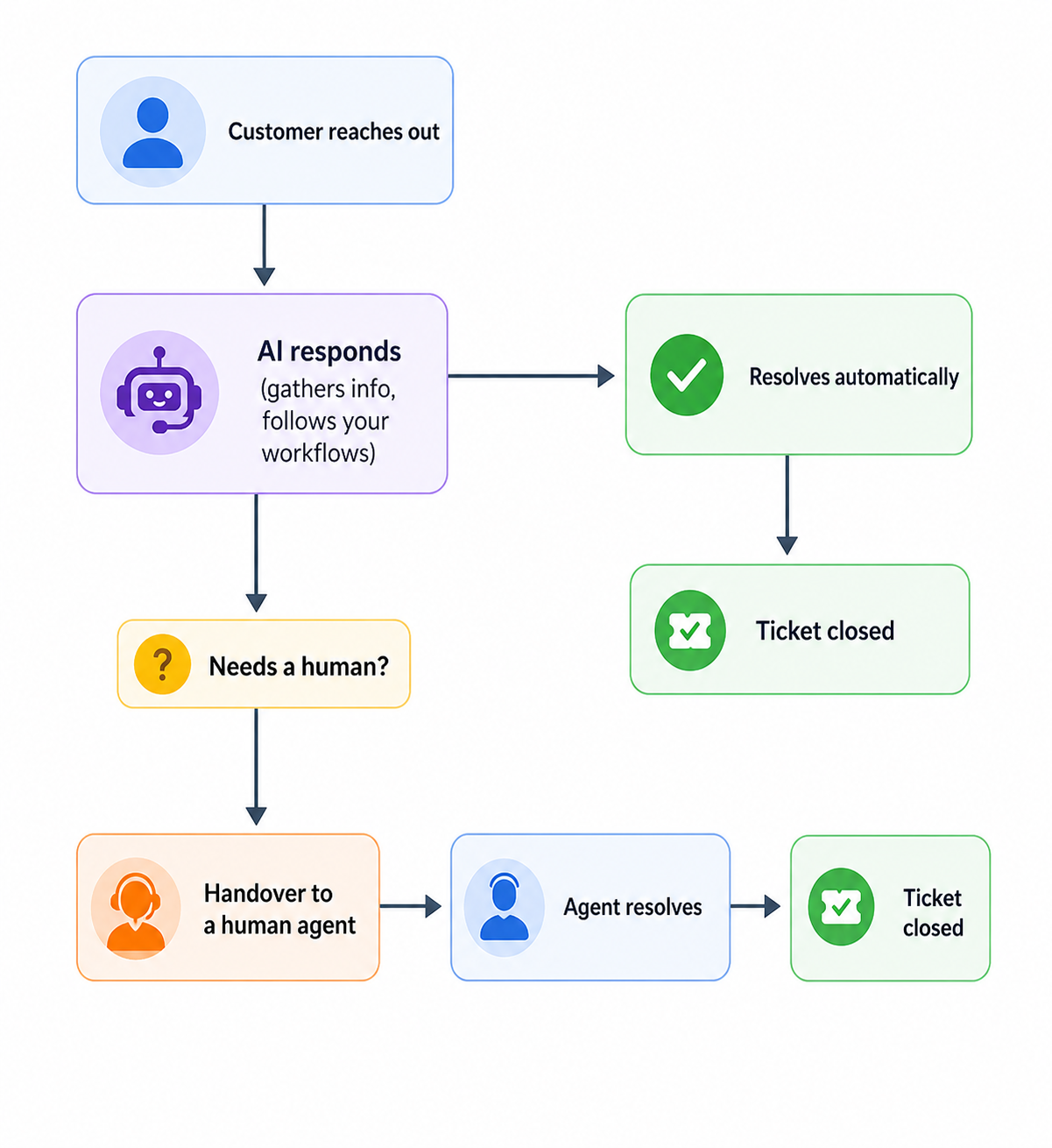
The AI follows the workflows you configure: it answers questions, looks up orders, applies your policies, and decides when a human should take over. A human takes over when, for example:
- Your process (SOP) requires it — e.g. a refund should go to a retention team rather than be processed automatically.
- The customer explicitly asks to talk to a person.
- The conversation sentiment turns frustrated or aggressive.
In Flowcall, "agent" means a human agent. When we mean the AI, we say "AI" or "AI agent." This is the opposite of how the word is often used elsewhere, so it's worth remembering.
A Note on Terminology
| Term | What it means in Flowcall |
|---|---|
| Agent | A human team member who handles conversations or works on tickets. |
| AI / AI agent | The automated assistant that handles the first level of every conversation. |
| Ticket | A unit of work created for every conversation — used to track status, ownership, and resolution. |
| Flow | The configured logic that controls what the AI does for a given customer journey. |
What You Can Do
| Area | Use it for |
|---|---|
| Inbox | Read and reply to customer conversations across every channel in one place. |
| Tickets | Track, assign, and resolve work — every conversation becomes a ticket. |
| Broadcasts | Send outbound WhatsApp templates, event-triggered messages, and campaigns. |
| Workflows | Configure how the AI handles each customer journey. |
| Copilot | Build and change AI workflows by chatting with an assistant. |
| Testing | Run automated, repeatable tests against your AI workflows. |
| Insights | Review tickets, CSAT, reported issues, agent activity, SLAs, and more. |
| Integrations | Connect channels, ecommerce, custom APIs, and Google Sheets. |
| Settings | Configure your business, team, tickets, knowledge base, and AI behavior. |
How the Workspace Is Organized
Everything is scoped to a single account (workspace). The data and insights you see always belong to the account you're currently logged into — switch accounts using the workspace switcher at the top of the sidebar.
The left sidebar is the main navigation. It starts collapsed by default; expand it and it stays open. The two areas agents spend most of their day in are Inbox and Tickets.
Start with Getting Started to understand the mental model and the people who use Flowcall.